
An invoice extractor that costs less per model call can still cost more to operate. Someone has to check the output, chase missing fields, and decide whether a result can go to bookkeeping. To compare two versions, divide the total cost of processing the same batch by the number of distinct invoices that pass review.
Define an accepted result before the run
For a pilot, select 100 invoices that your team is allowed to process. Include examples with multiple tax rates, credit notes, and unreadable scans in proportions that resemble the queue. Freeze the list and run both versions against the same files.
Write down the acceptance rule. In this example, the supplier, invoice number, currency, and total must match the reference record. A valid invoice that needs an operator to correct a field can still pass if assisted completion is part of the service. Label it as assisted and include the correction time. A referral to a human queue can be the right action. It stays outside the accepted count until it produces the result the service promises.
Price two runs on the same batch
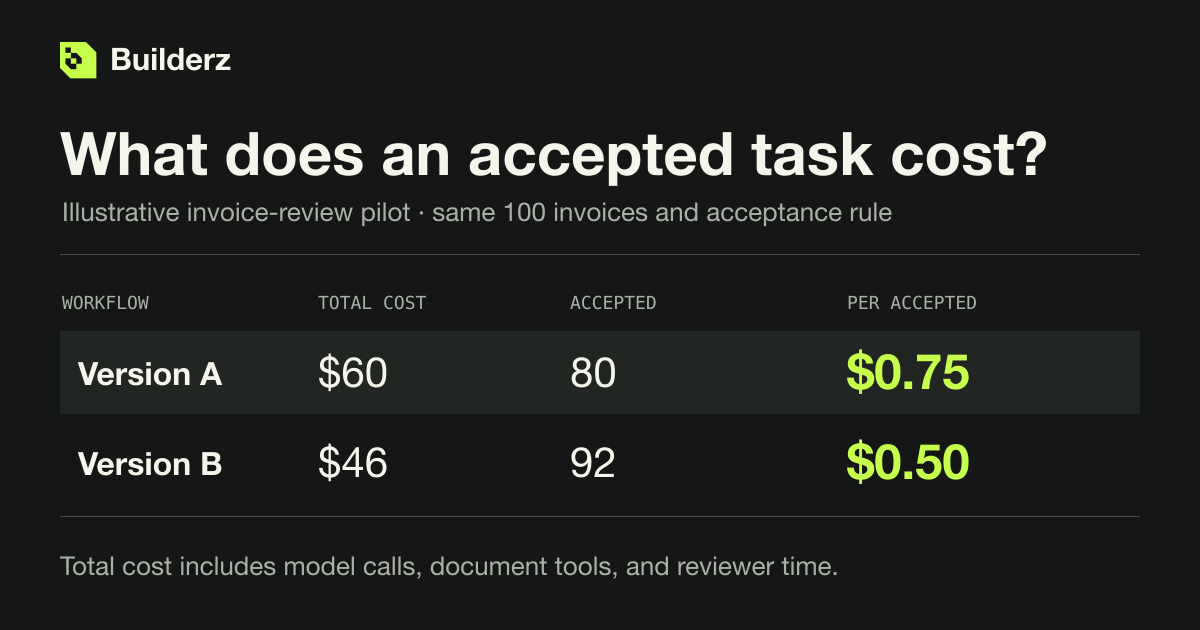
These figures are illustrative. Both versions face the same 100 invoices, the same rubric, and a reviewer whose time costs $30 an hour.
- Version A uses $16 in model calls and $4 in document tools. Review and corrections take 80 minutes, costing $40. The batch costs $60 and produces 80 accepted invoices. Each accepted result costs $0.75.
- Version B uses $24 in model calls and $4 in document tools. Review and corrections take 36 minutes, costing $18. The batch costs $46 and produces 92 accepted invoices. Each accepted result costs $0.50.
Version B spent $8 more on inference. It saved 44 minutes of review, worth $22 at the assumed rate, and delivered 12 more usable records. Show the acceptance counts next to the unit costs. A workflow can make its successful cases look cheap by deferring all the hard ones. If the business still owes someone the remaining eight results, keep that queue and its eventual cost visible.
Join attempts back to the original task
Give each invoice a stable task ID. Give every attempt a separate run ID. Record the billed model usage, paid tool calls, and review minutes against that task, including attempts that produced nothing usable. An invoice accepted on its third attempt contributes three attempts' costs and one accepted result. For a batch with zero accepted results, report the spend and zero completions. The unit cost is undefined.
Use the Builderz agent run cost estimator to forecast the model portion from steps, history size, cache use, and retries. Replace that estimate with billed usage when the pilot finishes. If you've used the estimator's retry setting, adding another retry allowance to the same forecast will inflate it.
Choose a version the operations team can run
Look at the cases each version missed. A transposed invoice total and a document deliberately sent for human review have different consequences even if both fail the automated pass. Set a ceiling for harmful errors and a limit on review time before using unit cost to choose a version. Keep the accepted artifact and review decision with each task so a second reviewer can check the result. Reviewing an agent task in Mission Control